Gaming PC Security Hardening Guide: Memory Integrity, VBS, and FPS-safe Windows Settings
Gaming PC security hardening protects your Windows machine, game accounts, network and drivers without costing you frames. Learn how Memory Integrity affects FPS, which anti-cheat tools require Secure Boot and TPM, and how to lock down Steam, Discord, Battle.net and your router in a 30-minute sprint.
Most PC tuning guides have security as something you turn off for frames. That trade is about to get a lot harder to do quietly. Microsoft announced on September 1, 2026, that starting in October 2026, Windows quality updates will start enabling Memory Integrity for eligible Windows 11 PCs, so a debate that used to be optional is landing on a lot more gaming rigs.
This guide distinguishes the hardening steps that cost you nothing in frame time from the ones that can. All the performance figures are quoted from a named test; all the recommendations say what they protect. If you want the wider Windows 11 baseline first, start with our gaming security hub, then return here for the FPS trade-offs and the account, network, and driver layers.
Key Takeaways
- Gaming PC security hardening means making your system safer by reducing the chances of being attacked across Windows, game accounts your home network and your drivers while making sure your frame times stay steady.
- Memory Integrity (HVCI) affects frames per second. Tom's Hardware found 5% overall loss with virtualization-based security on, about 2% at 4K Ultra, and gains of roughly 10% in the most CPU-bound games when it was off with 1% lows improving by up to 15%.
- Microsoft will start turning on Memory Integrity from October 2026 on eligible Windows 11 PCs through regular updates. PCs where it was already turned off will stay the same.
- Multi-factor authentication is the way to protect your account. A Microsoft Research study found it reduced the risk of an account being taken over by 99.22% in the accounts it looked at and dedicated authenticator apps worked better than SMS codes.
- Anti-cheat software cares more about Secure Boot and TPM 2.0 than about Memory Integrity. Valorant's Vanguard, Battlefield 6 and recent Call of Duty games require them, so never turn them off for frames per second.
- Network hardening does not affect game performance in use. Windows Firewall's default blocking of DNS-over-HTTPS and good router habits work on connection setup and configuration not on every game packet.
- Test before you make a decision. Compare frames per second and 1% lows in your own CPU-bound game with the setting on and off and think about differences that don't happen the same way, as noise.
What is Gaming PC Security Hardening?
Hardening the security of a gaming PC is reducing what an attacker can get to on your machine without the overhead that hurts frame pacing. In the real world, that's four layers: strong sign-ins on every game account, a network that refuses unsolicited connections, a Windows kernel that loads only trusted code, and drivers that come directly from the hardware vendor.
Only kernel protection via Memory Integrity among those four layers has a well-documented FPS cost. The other three are pretty much free, while you play. Microsoft Defender is a good baseline for malware scanning: in The Grid Nexus gaming PC antivirus benchmarks, Defender's gaming mode added near-zero performance impact.
Why Does Gaming PC Security Matter?
Gaming PCs have assets that are easy to sell, game libraries, skins, stored payment methods, logged in sessions to steam, discord and launchers. Most attack through software you install yourself. Our breakdown of fake game cheats that steal accounts shows the usual chain. A trainer asks for administrator rights and for Defender to be switched off, then an info-stealer collects browser cookies, Steam session tokens and Discord tokens and sends them out, often within minutes.
Analyst's note If you have ten minutes, spend them on your accounts and on what you install, not on kernel settings. Info-stealers usually read files your own user account can already open, so they never need to touch the kernel. That is also why stolen session tokens can sidestep two-factor codes, and why "don't run cracks, trainers or cheats from unofficial sites" is the single most effective rule on this page. |
|---|
- Does Memory Integrity (HVCI) Impact Gaming FPS and 1% Lows?
- Memory Integrity, also known as hypervisor-protected code integrity (HVCI), has Windows verify kernel-mode drivers and code in a separate virtual environment that utilizes virtualization-based security (VBS). The check prevents unsigned or malicious code from being loaded into the kernel. It uses CPU time. The cost is real but usually modest. In Tom's Hardware's 2023 test of 15 games on a Core i9-13900K with an RTX 4090, turning VBS off improved performance by up to about 5% overall, and only about 2% at 4K ultra. The largest gains were ten percent in average frame rate, and these gains happened in games that are very limited by the CPU, like Microsoft Flight Simulator. The 1% lows improved by up to fifteen percent. Hot Hardware said that the 1% lows are more affected by VBS than the frame rate. Two practical points come next. Resolution matters, because the extra work shrinks when the GPU becomes the limiter. A 4K player will hardly notice any difference while a 1080p esports player who wants high frame rates will. Hardware support matters too because CPUs, with Intel MBEC or AMD GMET reduce the work but they do not get rid of it completely. More recent coverage, including XDA Developers' September 2026 testing, also found a measurable but fairly small effect on average FPS, with 1% low results that varied by game.
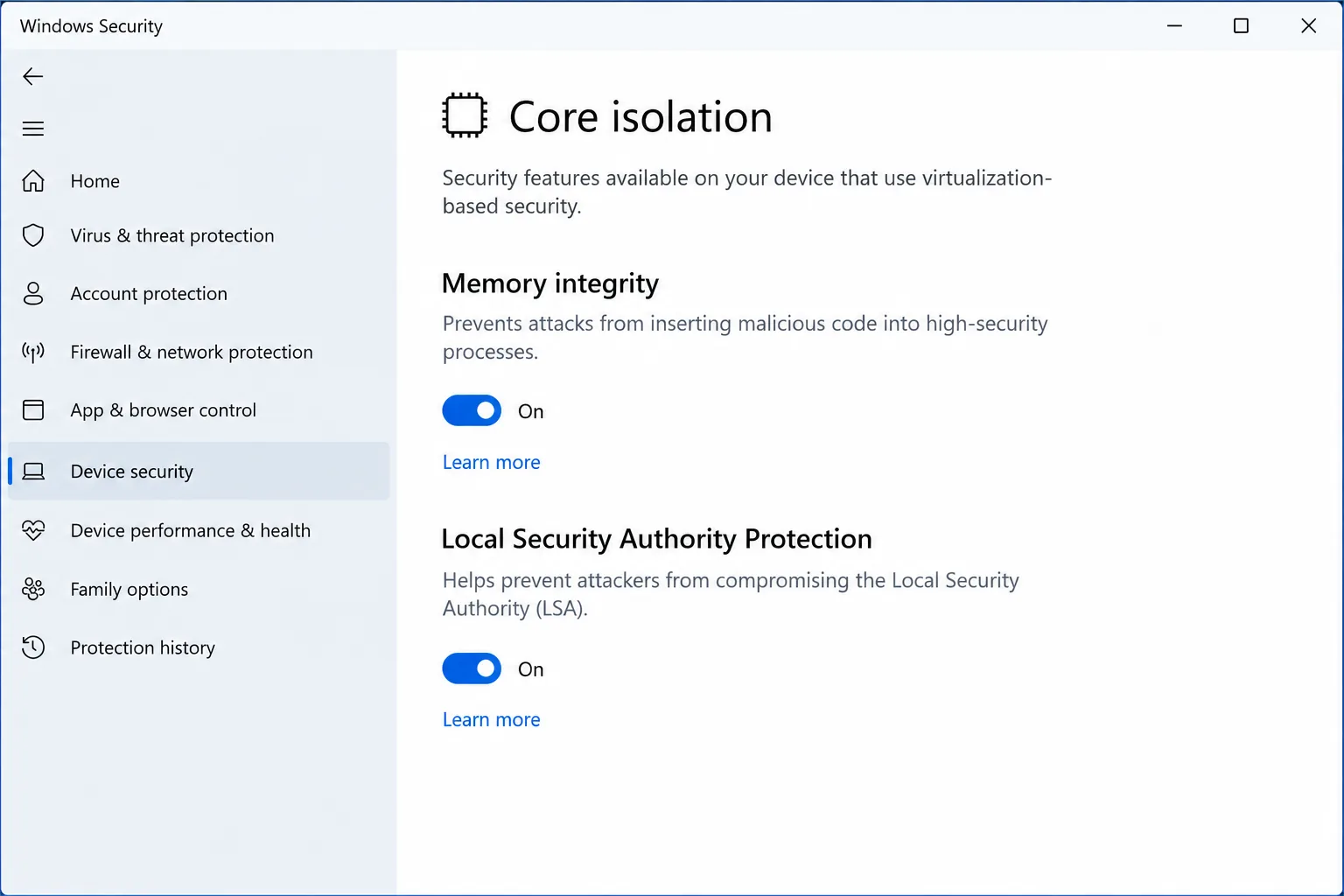
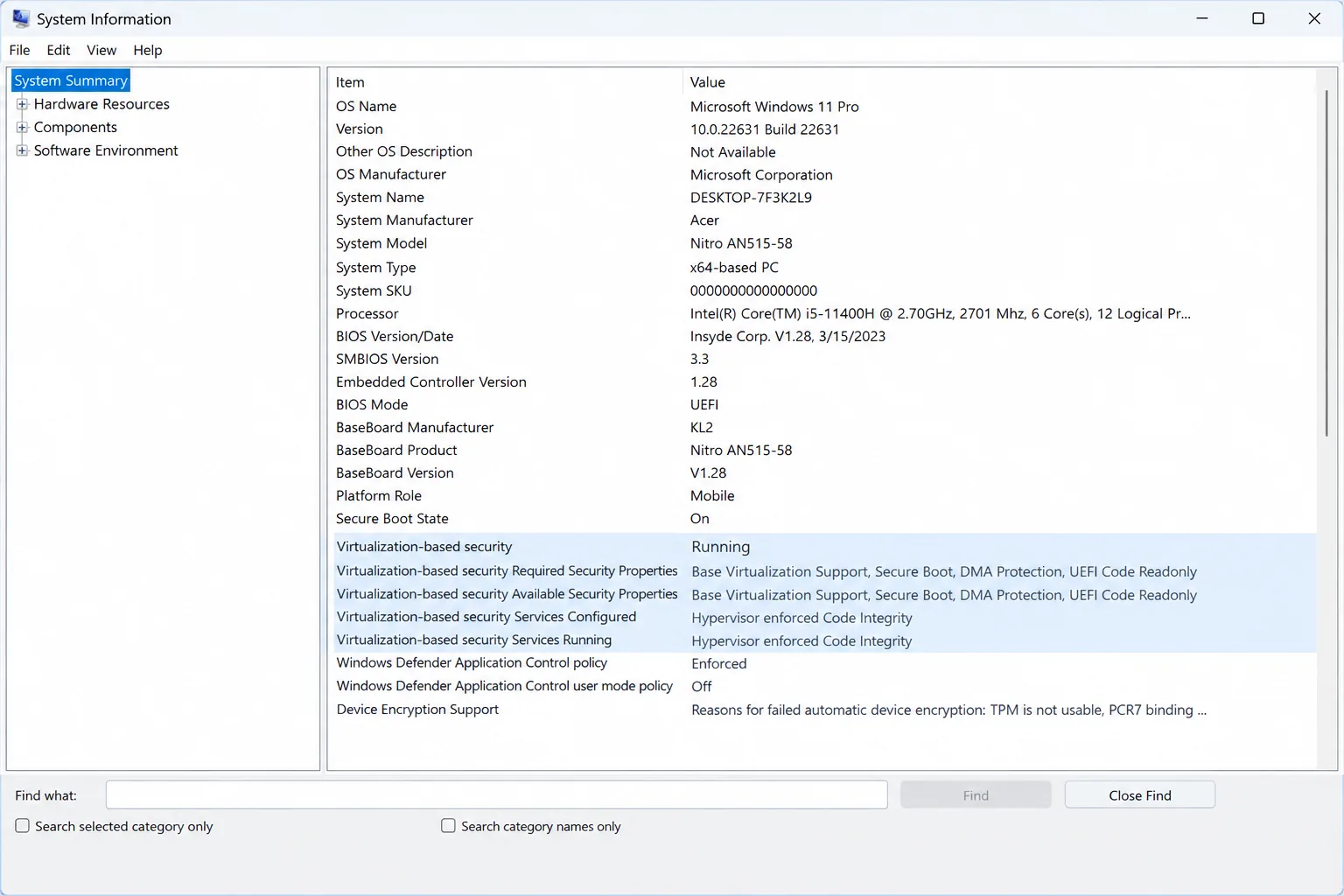
To see where your own PC stands, press Win + R, type msinfo32 and check the line "Virtualization-based security". "Running" means VBS is active; the Services line will list hypervisor-enforced code integrity when Memory Integrity is on.
What Changes in October 2026?
- Microsoft's September 1, 2026 Windows IT Pro Blog post says that from October 2026, Windows quality updates will begin enabling memory integrity protection on eligible devices, and will also turn on VBS where it isn't already running. The release will not affect devices where memory integrity has already been turned off. You can still look at the setting and make changes on your own.
- Memory Integrity starts automatically on Windows 11 installations on devices that meet the requirements and on Secured-core PCs, so the October update mainly affects machines that were moved from older versions of Windows or came with the feature disabled. If you compete in games, take a baseline performance test now. Do it again after the October update so you can see if the setting changed on your computer and what it did to performance. If Windows says a driver is not compatible, get the version from the device maker before you decide to disable the protection.
Should You Disable VBS for Competitive Gaming?
Turning off Memory Integrity can help get frames in CPU-bound games and it also takes away the protection that stops bad or faulty drivers from putting code into the Windows kernel. If it is worth doing depends on what else's running on the computer.
- Leave it on if you stream, put in mods, share the computer or use it for banking or work, or if your own performance difference is normal variation between runs.
- Think about turning it off on a computer that is only for competitive gaming at high refresh rate and low resolution with no mods or trainers, drivers from the manufacturer only, and a clear 1% improvement in your own A/B test.
- Do not turn off Secure Boot or TPM for frames. They do not affect performance, and some anti-cheat programs need them.
To do an A/B test play the same 60 to 120 second part of the game three times with Memory Integrity on restart after changing it off then do it three times again. Take the FPS and 1% lows using a frame-time tool like CapFrameX or PresentMon. Differences, between runs are often a few percent so only believe the ones that happen again.
Analyst's note Treat this as a reversible decision, not a permanent one. Windows updates and driver changes can flip the setting, especially with the October rollout, so re-check Windows Security and your benchmark after major updates instead of assuming your last answer still holds. |
|---|
- Which Windows Hardening Steps "Break" Anti-Cheat?
- The most likely parts to break anti-cheat are those that weaken the boot chain, not those that add protection. Riot's guidance on Vanguard support says Vanguard needs TPM 2.0 and Secure Boot on Windows 11. If either is off, it shows VAN9001 or VAN9003 errors. EA's Javelin anti-cheat in Battlefield 6 also requires Secure Boot and TPM 2.0, and Call of Duty's Black Ops 6 and Warzone now require Secure Boot as well. Some third-party guides say newer anti-cheat modes also require VBS and Memory Integrity. Requirements may change with each game update, so please check the game's official support page before changing any setting. Two other habits can cause preventable breakage. Be careful with debloat scripts that remove services or drivers, as they can break launchers, DRM or anti-cheat. Change one thing at a time and then launch your games. Smart App Control blocks untrusted or unsigned apps and has no per-app exception list, so it may block some mods and trainers; given the risks in our fake cheat malware analysis, that is often a feature rather than a bug.
- How to secure Steam, Discord and Battle.net accounts?
- Multi-factor authentication is the strongest account control with the strongest evidence to back it up. A study from Microsoft Research of Azure Active Directory accounts found that across the population MFA reduced the risk of compromise by 99.22% and by 98.56% when passwords had already leaked. It also found dedicated authenticator apps were better than SMS codes. These are not gaming accounts but commercial accounts, but the mechanism is the same. For platform-by-platform steps, see our Steam, Xbox, PlayStation and Discord security guide. The essentials are below.
- Give every platform a unique, long password stored in a password manager, and protect the email account that can reset them first.
- On Steam, enable Steam Guard through the Steam mobile app's authenticator rather than relying on email codes.
- On Discord, register a passkey or security key (up to 16 can be saved) and download your backup codes. Discord says it cannot help you back in if you lose them.
- On Battle.net, create a passkey so a tap on your device replaces the password.
- Store recovery codes offline, and review signed-in devices and sessions every quarter, signing out any you don't recognize.
- Reach every login by typing the official address or opening the official app. Never use a login link from a direct message.
Passkeys are tied to the genuine site's address, so a look-alike login page can't use them, which is why they hold up better than one-time codes against phishing. For a wider view of current attacks, read our guides on how to keep your gaming accounts safe in 2026 and improve security for online gaming.
What Firewall Settings Improve Security Without Adding Lag?
Windows Defender Firewall already blocks inbound connections and lets outbound traffic flow by default, so most gaming PCs just need a quick review instead of a full rebuild. Open wf.msc, scan the rules, and turn off or delete any rules that games and tools leave behind when you no longer use them. Keep networks on the Public profile so that the strictest rules are applied.
Do not switch to a defaultdeny outbound policy unless you are ready to keep rules for every launcher, game, anticheat service and updater; missing one rule can look like a game bug. Also skip "gaming firewall templates" that promise packets. A firewall only blocks traffic; the firewall does not prioritize it. Traffic prioritization is a qualityofservice feature that belongs to your router.
Does DNS-over-HTTPS Affect Gaming Latency?
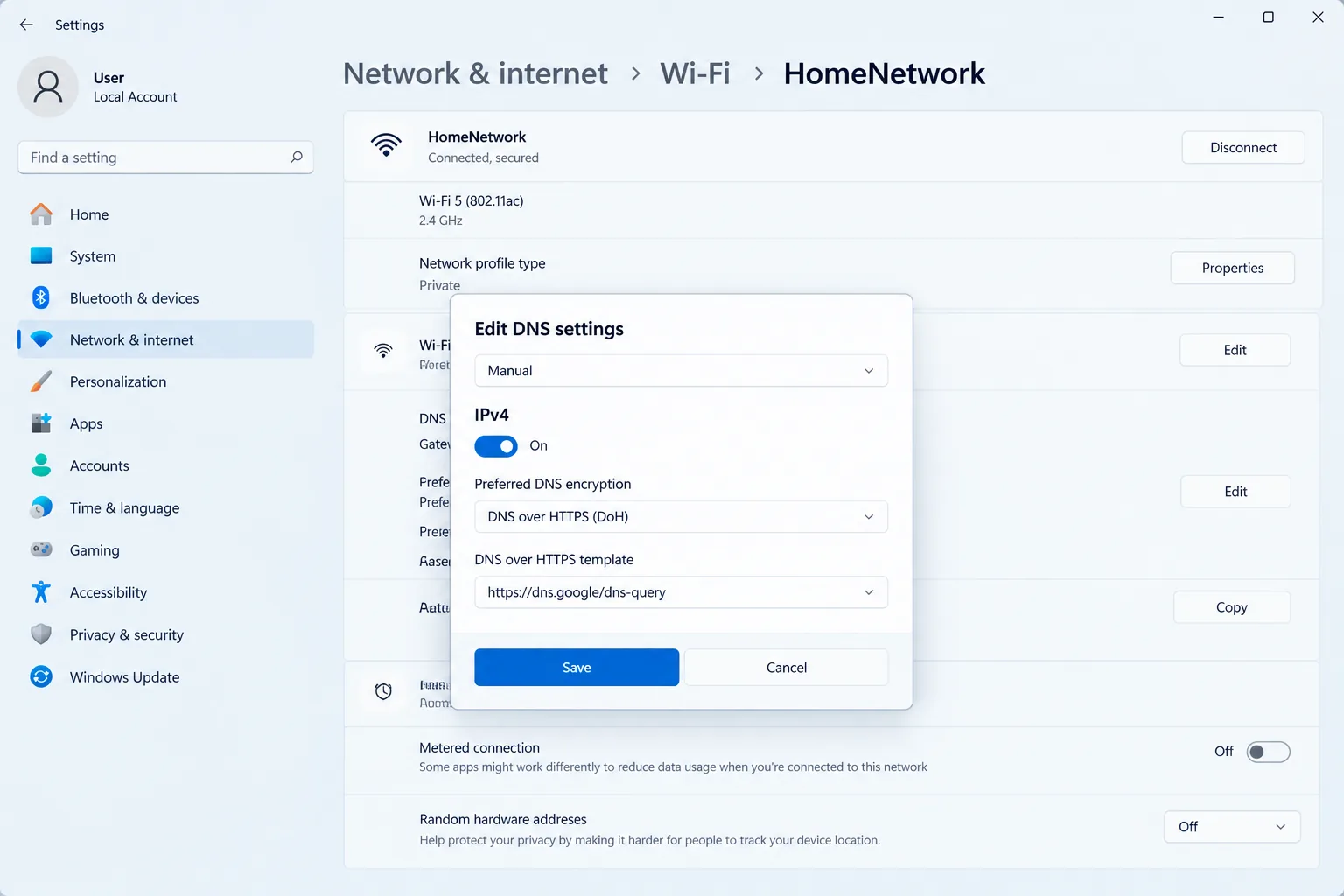
DNS-over-HTTPS or DoH keeps your DNS queries private by encrypting them. This means no one on your network path can see or interfere with the websites you try to reach. But here's the thing. DNS lookups happen only when you first connect to a server, not while the game is running. So, during a match, your in-game ping shouldn't be impacted.
On Windows 11, you can turn on DoH without tools. Just go to Settings, then Network & internet. Pick your connection, click Edit, and switch to DNS. Then choose the encrypted option for a provider like Cloudflare, Google, or Quad9.
Even though DoH hides what websites you visit, it doesn't hide your destination IP addresses. It also doesn't stop malware that you already have on your system. If you want DoH at the router level, make sure your router's firmware supports it. Otherwise, you can't rely on it being active across all devices.
How Do Streamers Protect Against DDoS Attacks?
Streaming to a platform such as Twitch or YouTube does not show your home IP address to viewers because your PC sends video to the platform's servers. Streamers usually get exposed through peer-to-peer game sessions, direct connections, and IP-logging links posted in chat or direct messages. Prefer game modes that use servers; decline unknown party and friend requests and don't open links from strangers while live.
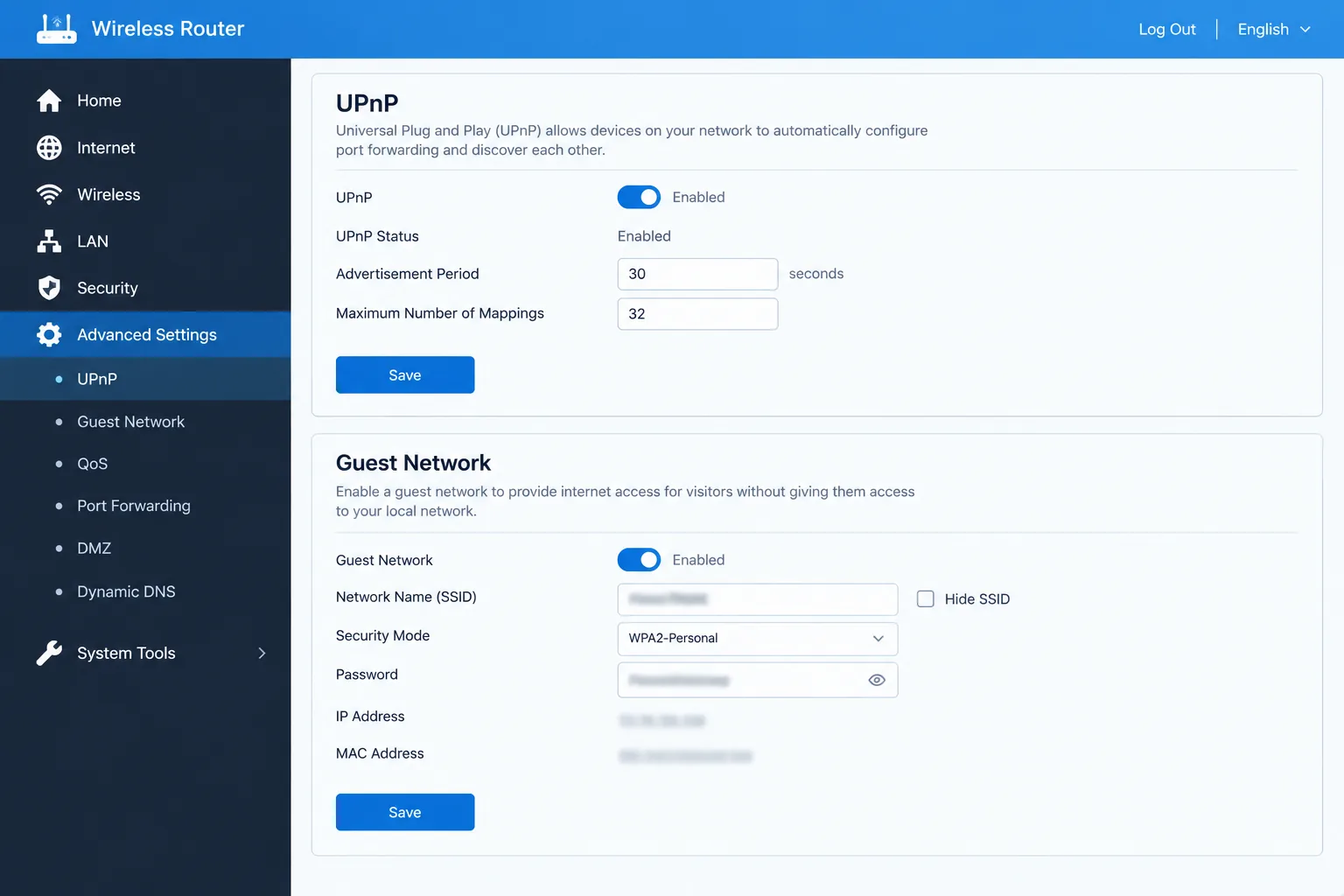
Then harden the router. Disable UPnP unless a game truly needs it because UPnP lets software open inbound ports automatically. Put home and IoT devices on a guest network and keep router firmware current. Finally, plan for an attack before it happens: keep a hotspot or second connection ready and know how to reach your ISP to request an IP change if your line is flooded. For account and network precautions, see our gaming security hub.
- How To Do Safe GPU Driver Clean Install?
- A clean install of the gpu driver will get rid of any remnants or corrupted files that may be causing your crashes and stuttering. It won't boost fps on a healthy install so use it as a troubleshooting aid, not as routine tuning. For example, NVIDIA's custom install has the checkbox for "Perform a clean installation." This is the clean-install option of the vendor installer itself. If it still doesn't work, run Display Driver Uninstaller (DDU) in Safe Mode, reboot and install fresh package.
The bigger security issue is the driver's origin. Only download graphics drivers from NVIDIA, AMD or Intel, or from your PC maker. Avoid third-party driver-updater tools. Sometimes attackers can use legitimately signed, but vulnerable drivers as a way to get to the kernel. That's where Memory Integrity and Microsoft's list of vulnerable drivers can help stop this. Stable releases are safer for competitive play, as beta drivers come with the risk of crashes.
Which Hardening Setup Fits Your Playstyle?
Player type | Priority protections | Performance-sensitive choices | Network focus |
|---|---|---|---|
Casual gamer | Defender on, Secure Boot and TPM on, MFA on every account | Leave Memory Integrity on; trim startup lightly | DoH enabled, router firmware current |
Competitive FPS player | Passkeys or authenticator, vendor-only drivers, no mods or trainers | A/B test Memory Integrity in your CPU-bound game; keep Secure Boot and TPM on | Review inbound firewall rules, UPnP off |
Streamer | MFA, DDoS response plan, router hardening | Leave Memory Integrity on; change startup items conservatively | Dedicated-server modes, guest network for IoT, backup connection |
What Should You Do Next? A 30-Minute Hardening Sprint
A single half-hour session covers the layers that matter most. Do them in this order, and write down your settings so you can restore them after a major Windows update.
- Minutes 0 to 10, accounts: enable an authenticator or passkey on email, Steam, Discord and Battle.net, and save the backup codes offline. Our platform-by-platform account settings guide walks through each one.
- Minutes 10 to 15, DNS: turn on DoH in Windows 11 for your active connection.
- Minutes 15 to 20, network: open wf.msc and remove stale inbound rules, then check your router for UPnP and firmware updates.
- Minutes 20 to 30, Windows: confirm Secure Boot, TPM and Defender are on, record a baseline benchmark in your main game, and check whether Memory Integrity is on.
Afterwards, score your setup with our free Gaming Security Checkup, which runs in your browser and stores nothing. Then repeat the account and router review every three months.
Common Questions
Does Memory Integrity reduce FPS in games?
Yes, but by a small amount. Tom's Hardware measured 5% overall performance loss with virtualization-based security on, about 2% at 4K ultra and around 10% in the most CPU-bound games, with 1% lows affected more than averages. The effect is largest at resolutions on fast GPUs where the CPU is the bottleneck.
Will Windows turn on Memory Integrity automatically?
Yes, on PCs. Microsoft said in a September 1, 2026 announcement that quality updates starting in October 2026 will enable Memory Integrity and VBS where needed. The rollout will not change PCs where Memory Integrity was already disabled.
Is it safe to turn off Memory Integrity for gaming?
It is a trade-off not a win. Turning it off removes a layer that blocks vulnerable kernel drivers. It is most defensible on a competitive PC with no mods or trainers vendor-only drivers and strong account security and only if your own benchmark shows a repeatable gain.
Do I need to keep Secure Boot and TPM 2.0 on for anti-cheat?
Yes for popular games. Riots Vanguard requires TPM 2.0 and Secure Boot on Windows 11 Battlefield 6 requires both and recent Call of Duty titles require Secure Boot. Turning them off costs no FPS to recover and can stop the game from launching.
Does DNS-over-HTTPS add lag to online games?
It is not expected to. DNS lookups occur when a connection is set up not during play so DoH mainly adds an encryption step, at connection time. It protects lookups from tampering. Does not hide the servers you connect to.
Do I need third-party antivirus on a gaming PC?
Not necessarily. Microsoft Defender is a solid baseline, and in The Grid Nexus antivirus benchmarks its gaming mode had near-zero performance impact. The larger risk is running untrusted cheats, cracks and mods, which no scanner fully offsets.
What should I do if I think a gaming account was compromised?
Change the password from a clean device, secure the email account tied to it, sign out all sessions, and re-enable MFA. If you ran a suspicious cheat or crack, treat the PC as compromised too. Our account security guide covers recovery steps for Steam, Xbox, PlayStation and Discord.
Conclusion
Layered hardening keeps your accounts safe. Your network is secure and your kernel is protected without making you choose between safety and performance. The accounts, the network, and the driver layers are free while you play, and Memory Integrity is the one setting worth checking on your hardware. Begin with the 30-minute sprint check performance before and after the October Windows update, and look at the choices again every three months.
For more step-by-step help, browse our gaming security guides or the gaming security hub.
Sources
- Expanding memory integrity protection across Windows devices – Microsoft Windows IT Pro Blog, Sept 1, 2026
- Tested: Default Windows VBS Setting Slows Games Up to 10%, Even on RTX 4090 – Tom's Hardware, March 2023
- Benchmarked: Do Windows 11's Security Features Really Hobble Gaming Performance? – Tom's Hardware, Oct 2021
- This Default Windows Setting Can Choke Game Performance Even On Flagship GPUs – HotHardware, March 2023
- Windows 11 is flipping a hidden setting next month – XDA Developers, Sept 2026
- How effective is multifactor authentication at deterring cyberattacks? – Microsoft Research
- Troubleshooting VAN 9001, VAN 9003 or VAN 9090 on Windows 11 – Riot Games Support
- Battlefield 6 and Black Ops 7 both need Secure Boot and TPM 2.0 – The Sixth Axis
- Passkeys and Security Keys – Discord Help Center
- Passkeys and One-Time Passcodes – Blizzard Entertainment
Explore the Gaming Security Hub
Related reading
- The Ultimate Mobile Gaming Security Guide: Protect iOS and Android Accounts
- Best Gaming PC Under $1000 in 2026: Build Smart in a Brutal Market
- World of Warcraft Midnight Expansion Review: Blizzard's Boldest Lore Bet in Years
- Monster Hunter Stories 3: Twisted Reflection Review — Capcom's Best Spin-Off Yet?
- Crimson Desert Review: Pearl Abyss Swings Big With a Brutal Open-World Action RPG