The Ultimate Mobile Gaming Security Guide: Protect iOS and Android Accounts
Mobile gaming security is a stack of layers, not a single setting. Learn how to lock down iOS and Android gaming accounts with unique passwords, a password manager, two-factor authentication and passkeys, official app stores, permission reviews, and a monthly session audit — plus the exact steps to take in the first hour if an account is taken over.
You probably already protect your phone with a passcode or with Face ID or a fingerprint. Your gaming accounts are protected only by a login — which attackers can guess, phish, or buy from a breached database. This guide explains how to make gaming accounts safe on iPhone and Android how to recognize phishing and prize scams, which settings are most important on each device and what to do in the first hour if an account is taken over. It is part of The Grid Nexus gaming security coverage.
Key Takeaways
- Mobile gaming security protects gaming accounts, in-app purchases and personal data on phones and tablets from account takeover, fraud and malware.
- Password reuse is a reason gaming accounts get taken over because hackers use leaked passwords from other websites to try and log in; a unique password for each account stored in a password manager stops that.
- Two-factor authentication makes it much harder for hackers to take over an account: Microsoft Research found that using forms of authentication reduced the chance of getting hacked by 99.22% in a big study of work accounts and apps that do this work better than text messages.
- Downloading games from the App Store or Google Play makes it less likely to get malware and Google says there is more than 50 times more malware from other sources; official stores help but do not completely stop it.
- Both iOS and Android can protect gaming accounts well; the main thing is whether the device gets updates and whether the built-in protections are actually turned on.
- Passkeys, Play Protect, Face ID or fingerprint unlock, a passcode and checking permissions every month all work together to create a strong defense against account takeover.
What Is Mobile Gaming Security?
Mobile gaming security is the group of actions and tools that keep gaming accounts, in-app purchases and personal data on phones and tablets safe from people who should not have access, fraud and malware. It includes the device itself and every online account that is linked to games like Fortnite, Roblox, PUBG Mobile and Call of Duty: Mobile, as well as mobile casino and sports games. It is one part of the area of online gaming security, which also includes PCs, consoles and home networks. Mobile gaming security works best as layers rather than a single setting. A device passcode protects physical access, a unique password protects the account, and two-factor authentication (2FA) adds a further barrier if that password ever leaks. A stolen password, for example, does not unlock an account when the attacker also needs a one-time code from an authenticator app.
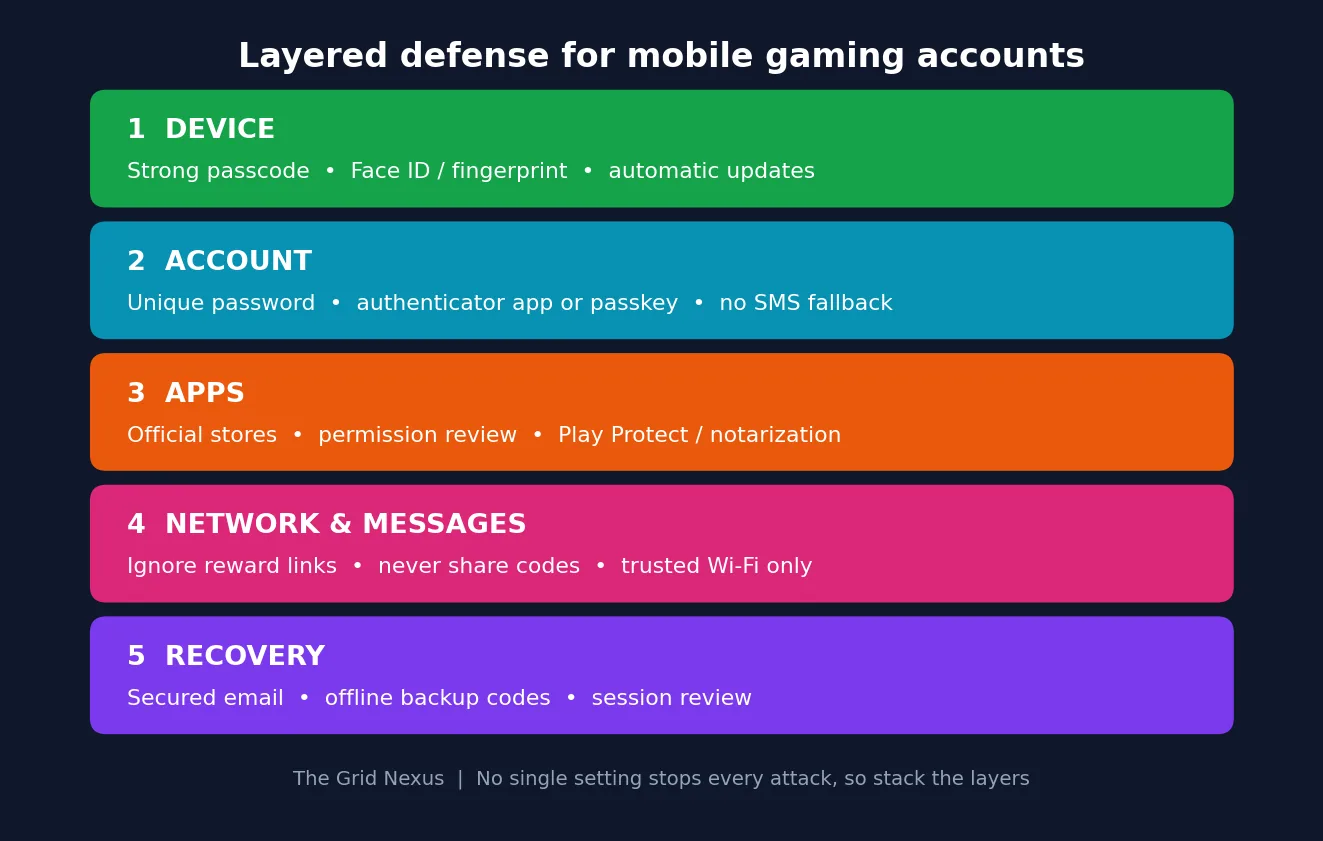
In account takeover stories for mobile games the first sign wasn't a password change but a session token that was used again from a new device shape while the original phone was still working. The attacker was flagged as a new device, got past two-step verification, and quietly added a second email before any spending issues showed up. That's why on any phone or after a big operating system update the first step is to end all sessions completely ("log out everywhere") and then sign in again only on devices you control.
Why Does Mobile Gaming Security Matter?
A stolen gaming account can expose items, saved payment details, personal information and the friends list. People who take over an account might sell items, spend the saved payment methods, or change the recovery info to keep the real owner out or send scam links to the friends list. Gaming accounts are targets because they have things that can be sold and payment methods linked. One account is often connected to an email, a media profile or a console so one mistake can cause more problems. Using stolen usernames and passwords from breaches to try to log in is a known reason for these issues. In a 2020 report, Akamai found 10 billion attempts to use stolen credentials on the gaming industry out of more than 100 billion total across all areas from July 2018 to June 2020. Recent numbers are different depending on where they come from and how they are counted but the real problem is still there. Takeaway holds: treat a gaming account with the same care as an email or banking account. For the studio-side view, see how gaming platforms detect account takeover and phishing.
What are the biggest risks for mobile gaming accounts?
Fake reward sites, phishing, credential stuffing, malicious or modded apps, SIM-swap attacks and insecure networks pose the biggest threats to mobile gaming accounts. They may take different routes, but the end goal is usually the same; to steal credentials, session data, payment details or outright control of the account. For reporting threats that are not mobile, follow The Grid Nexus cybersecurity coverage.
How Do Hackers Steal Gaming Accounts on iOS and Android?
Hackers can steal mobile gaming accounts by duping players directly, recycling passwords leaked from other sites, spreading malicious software disguised as a game or mod, hijacking a phone number or intercepting logins on an unprotected network. Examples include:
- A chat message offering free in-game currency for a login.
- A fake tournament page requesting a one-time verification code.
- A changed game that silently reads notifications or accessibility data.- An automated login attempt using a password that has been leaked from another site.
- A bogus customer support account that requests recovery information.
- A SIM swap that redirects SMS verification codes to the attacker.
- A public Wi-Fi network that was used to deliver a malicious redirect. Malicious mods and unofficial game packages can carry spyware, credential stealers, or aggressive adware. Fake cheat and mod malware is a well-documented route for info stealers, which can copy saved passwords and session tokens from an infected device; that research focuses on PCs, but the same logic applies to modded APKs on Android. Studios fight cheating from their side with AI-enhanced anti-cheat systems, yet no anti-cheat protects a player who installs the malware voluntarily. Permissions matter here too: in an analysis of major fraud-malware families that abuse sensitive permissions such as reading SMS or notifications, Google found that over 95% of installs came from internet-sideloading sources.
How Can You Avoid Gaming Phishing Scams on Mobile?
A gaming phishing scam is a trick message or website that tries to take your login details, payment information or a verification code. The safest thing to do is ignore the link and open the game or publisher website by typing the address yourself. Watch for warning signs of a gaming phishing scam. These signs are: a tone or a "limited‑time" reward promise; a domain that looks wrong or a very short link a request for a password, a backup code or an authenticator code a reward that seems too good to be true a message that looks like it comes from a moderator or support staff but is not and a login page that does not match the publisher’s normal website. A message that says "verify your account in five minutes or lose your skins" is designed to make you act quickly. The better response is to close that message open the game and look at the publisher’s official support channel. Generative AI makes these lures easier to create and harder to spot. This trend is described in our report. on AI-driven security threats in 2026, and the same too-good-to-be-true pattern appears in gray-market game key scams. To practice recognizing these lures safely, try The Grid Nexus interactive Breach Simulator for security training.
Why Are Strong Passwords and Password Managers Essential for Gamers?
Strong, unique passwords are important because when you reuse a password, one unrelated security breach can unlock gaming accounts at once. A password manager helps keep credentials realistic to maintain by automatically generating and storing long random passwords. Use a different password for every game publisher, email account, and platform identity, and do not use names, birthdays, team names, phone numbers, or predictable substitutions such as swapping the letter a for the symbol @. A reputable password manager, like Apple Passwords, Google Password Manager, Bitwarden, 1Password or Proton Pass, should generate random passwords, warn if a password is reused or exposed, support passkeys where possible, lock behind a strong master password or biometrics, and provide secure recovery. A randomly generated twentycharacter gaming password that you never type or reuse directly limits the damage caused by stuffing. Start with the email address linked to your gaming accounts because that inbox can reset every other password. The full accounthardening order is covered in this guide to keeping your gaming accounts safe in 2026.
How Does Two-Factor Authentication Stop Account Takeovers?
Two-factor authentication (2FA) requires a second verification step after the password, such as a code from an authenticator app, a security key, or a biometric-backed passkey. It blocks many account takeovers because a stolen password alone is no longer enough. In a large study of Microsoft work accounts, Microsoft Research found that multifactor authentication reduced the risk of compromise by 99.22% overall and by 98.56% when credentials had already leaked. That study covered enterprise accounts rather than gaming accounts, but it also found that dedicated authenticator apps outperformed SMS codes.
Whenever a game or publisher offers 2FA, enable it in the account-security settings, ideally with an authenticator app or passkey rather than SMS. SMS codes can be intercepted through SIM-swap fraud: the UK fraud-prevention service Cifas recorded nearly 3,000 unauthorised SIM swaps in 2024, a 1,055% rise on the previous year, although from a small base. US cybersecurity agency CISA advises highly targeted people to avoid SMS as a second factor and disable SMS as a fallback once a stronger method is enrolled. For most players, SMS 2FA is still better than no 2FA, but it should be the last choice, not the first.
Support for two-factor authentication varies by game. Many mobile games offer email or text codes and not all publishers support passkeys yet. When a game offers nothing protect the linked email account with an authenticator app or passkey and protect the phone number with your carriers port-out or SIM-lock feature if it offers one.
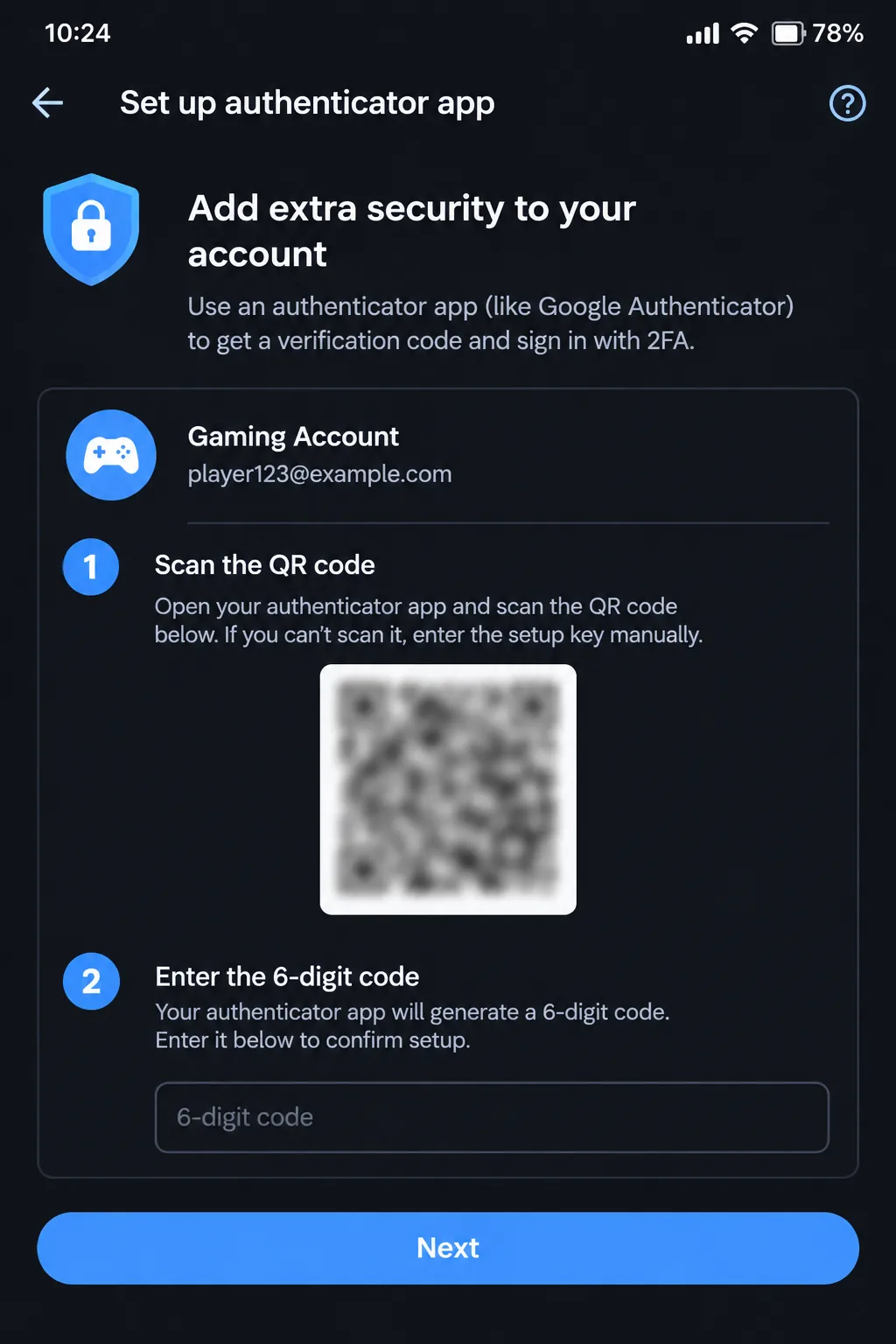
A secure two-factor authentication setup typically follows these steps:
- Open the publishers app or website.
- Go to Account, Security or Login Settings.
- Turn on two-factor authentication or passkey sign-in.
- Scan the QR code with an authenticator app.
- Store the recovery codes offline.
- Remove SMS or phone-number recovery where the publisher allows it and sign out of unfamiliar sessions.
If an attacker obtains a password through a reward site, the authenticator prompt or passkey can still stop the login. For a look at passkeys and passwordless sign-in, read our overview. of identity-centric security and passwordless authentication.
A common account-takeover pattern: the user enabled a TOTP authenticator app but left SMS as the recovery option. The attacker SIM-swapped their number, and then triggered “forgot 2FA” and got an SMS recovery code, effectively bypassing the authenticator. The fix is to remove SMS from the account altogether, changing recovery to backup codes plus a secondary email, and re-enrolling 2FA with the authenticator app as the only allowed method.
What iOS Settings Protect Gaming Accounts Best?
The strongest iOS protections for gaming accounts include a device passcode, Face ID or Touch ID, automatic updates, installs from the App Store, Apple Account two‑factor authentication, and careful privacy settings. Together, the iOS protections guard both the iPhone and the accounts used on it. Installing games from the App Store cuts malware risk because apps pass Apple review before they appear on your device. That safety no longer covers every place. Apple now permits app distribution, such as third‑party marketplaces in the EU, Japan, and Brazil. Those apps still go through Apple notarization, a baseline check, but each distributor sets its own review standards, and Apple warns of increased privacy, safety, and security risks. Avoid game installers, "private servers," cheats, and free-currency tools offered outside the App Store, and check the developer name, reviews, update history, and official links before installing.
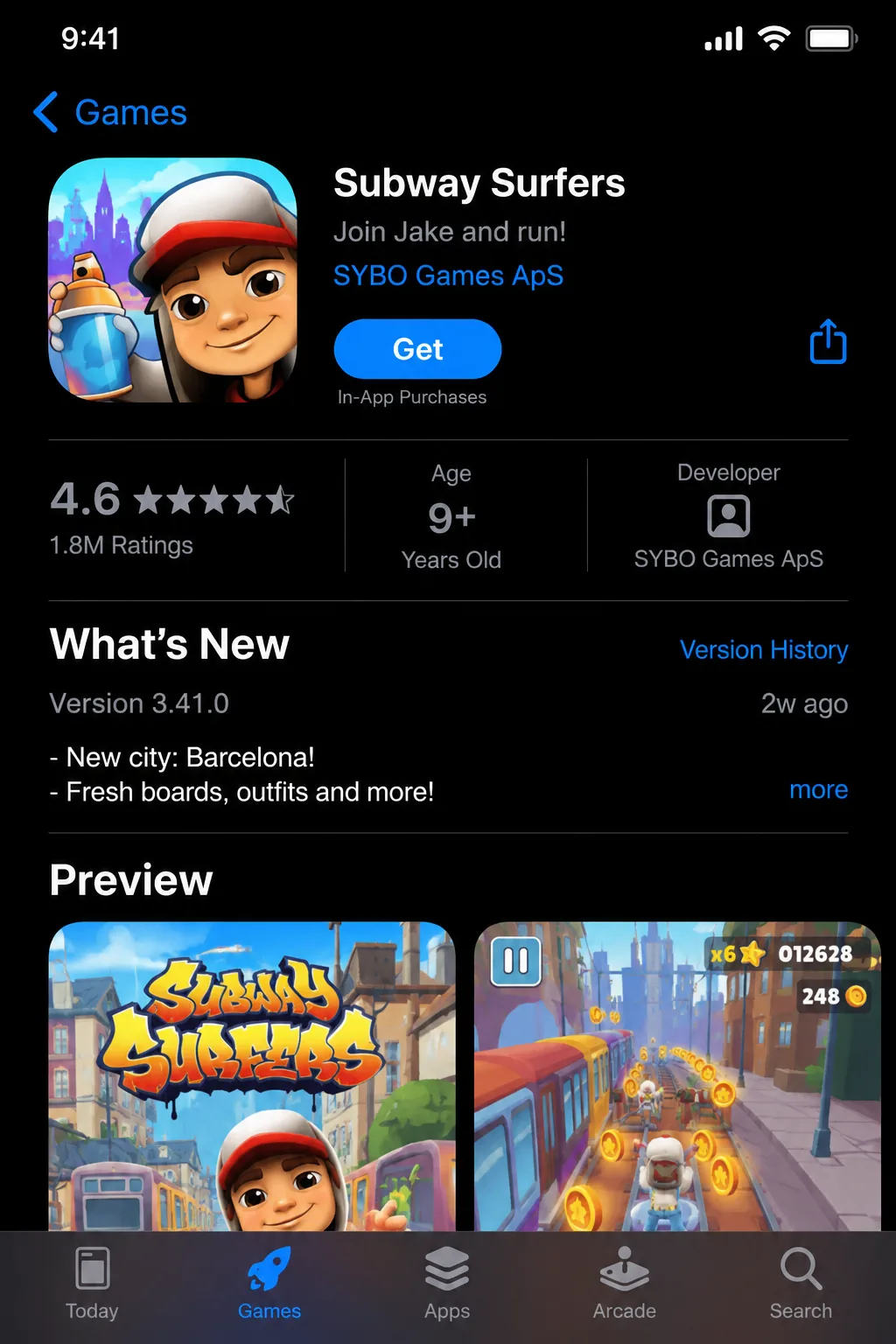
A strong iPhone passcode helps protect saved passwords, active sessions, and gaming apps if the device is lost. Using an alphanumeric passcode along with Face ID or Touch ID offers both security and convenience. Sign in with Apple can help reduce password exposure on participating games and websites, and Apple requires two-factor authentication on the Apple Account for that feature.
Apple's Stolen Device Protection: This feature is available on iOS 17.3 and later. It adds safeguards when an iPhone is away from places such as home or work. Actions like using saved passwords require Face ID or Touch ID with no passcode fallback. Changes like an Apple Account password trigger a one‑hour Security Delay. Turn it on under Settings, then Face ID & Passcode Stolen Device Protection. Also worth reviewing: which apps use Sign in with Apple saved credentials in Apple Passwords, in‑app purchase restrictions, on family devices, and App Tracking Transparency choices. Parents can start with our guide to Roblox account security and safety, and anyone can benchmark their overall setup with the free Security Score Checker.
What Android Settings Protect Gaming Accounts Best?
If you want to keep your Android gaming account safe, use Google Play Protect, a screen lock, automatic updates, permission reviews, passkeys, and stay away from risky sideloads or root access. Android gives controls, but because Android phones from different makers and Android versions are not the same, you should look at each setting on your own Android device instead of thinking it will be the same, as in the example below. Google Play Protect scans apps for harmful behavior and can warn about or remove unsafe apps, including those installed outside the Play Store. To run it, open the Google Play Store, tap the profile icon, choose Play Protect, and start a scan. Keep "Scan apps with Play Protect" turned on, and investigate every warning instead of dismissing it.
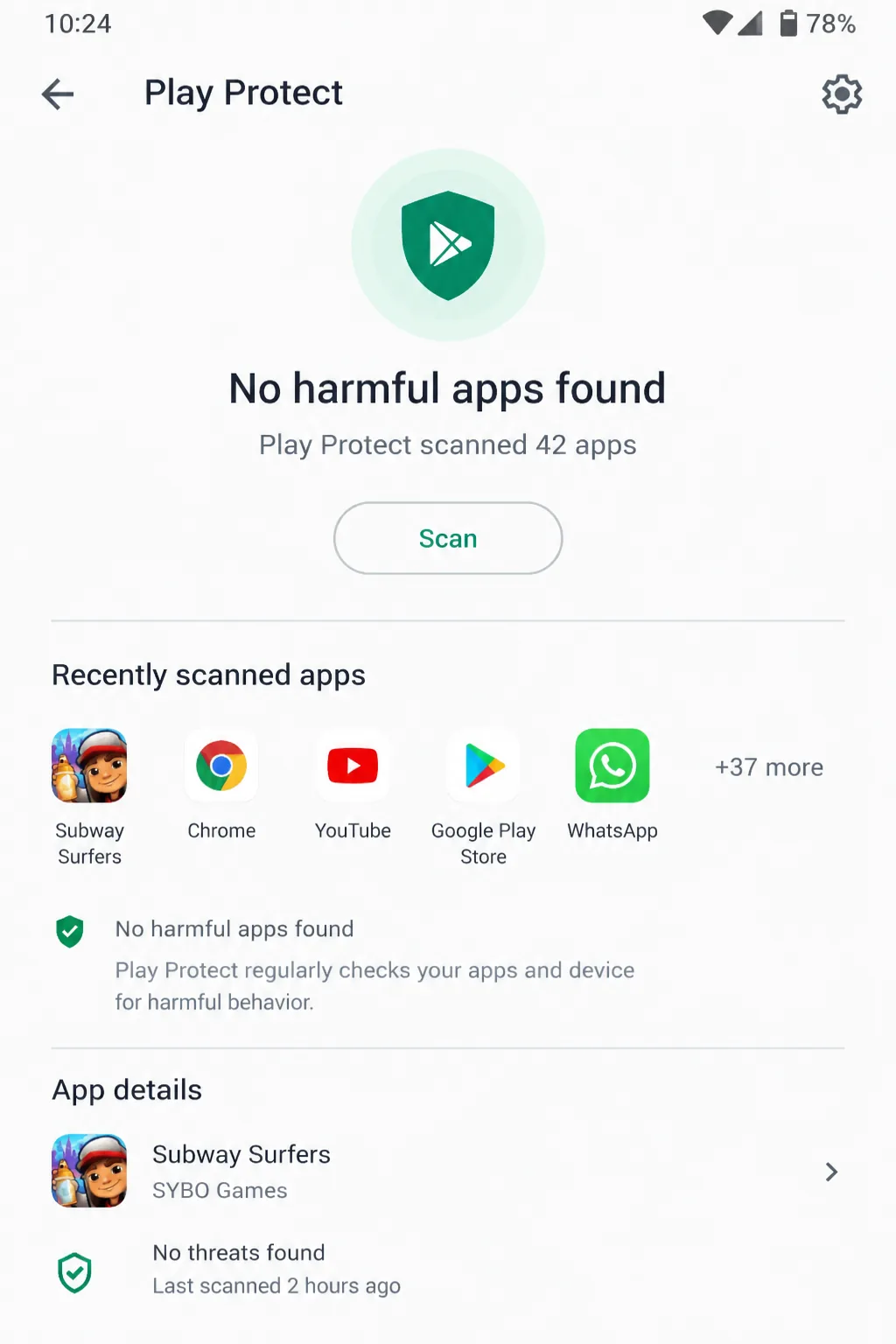
Android permission controls restrict what an app can access. Android permission controls cover notifications, contacts, storage, camera, microphone, and accessibility services. It is best to grant a game only the permissions it truly needs. For example, a simple puzzle game rarely needs SMS or accessibility access. Use Settings → Privacy → Permission manager to review and revoke any extra permissions.
Rooting a phone or installing games from APK sites bypasses the normal store review. Rooting a phone removes those default protections and can lead to unwanted software being installed without your knowledge. Google reports more than 50 times more malware from internet-sideloaded sources than from Google Play, a figure that the open-source app store F-Droid disputes. Official stores are not immune either: researchers reported NoVoice malware in more than 50 Google Play apps with over 2.3 million downloads in 2026, and Google says Play Protect removes those apps.
Android's sideloading rules are also changing. From September 30, 2026, certified Android devices in Brazil, Indonesia, Singapore, and Thailand will require apps to come from developers registered with Google, with a global rollout planned for 2027. Apps from unregistered developers can still be installed through an "advanced flow" or ADB. The program verifies who published an app, not what the app does, so it makes malicious publishers easier to identify without guaranteeing that a registered app is safe.
Passkeys use a device's screen lock, fingerprint, or face scan instead of a password and are built to resist phishing. Google notes that, unlike passwords, passkeys can't be shared, copied, or written down. Google Password Manager or another reputable manager can store both passwords and passkeys.
Is iOS or Android Safer for Mobile Gaming Security?
Both iOS and Android can provide mobile gaming security when software is kept up to date and unsafe apps, links, and credentials are avoided. Neither iOS nor Android removes the need for account‑level protections such as passwords and 2FA. The operating system hardens the device. The account still has to be secured separately.
Security dimension | iOS | Android |
|---|---|---|
App distribution | App Store review and controlled distribution reduce exposure to unofficial apps. Alternative marketplaces exist in the EU, Japan, and Brazil, with notarization as a baseline check. | Google Play plus Play Protect scanning; broader install options place more responsibility on the user. Developer verification starts September 30, 2026 in four countries and goes global in 2027. |
Permissions | Privacy controls limit tracking and access to device data. | Granular permission controls allow detailed review of what each app can access. |
2FA and passkeys | Apple Account 2FA, Sign in with Apple, iCloud Keychain, and passkeys support secure sign-in. | Google Account 2FA, Google Password Manager, and passkeys support secure sign-in. |
Updates | Apple controls hardware and software distribution closely, though older devices eventually lose support. | Update timing varies by manufacturer, model, region, and carrier. |
Sideloading / modification | Jailbreaking weakens platform protections and increases risk. | Sideloading and rooting can bypass safeguards and expose sensitive permissions. |
If you are an iPhone user who installs games from the App Store, turns on Stolen Device Protection, and signs in with Apple, you get a strong baseline with only a few settings to manage. This setup also works well for families who need Screen Time limits and purchase controls. If you are an Android user who likes permission management, you can get more granular control: you can revoke notification access from a suspicious app, run a Play Protect scan, or delete an unused APK without resetting the whole device. No platform is a winner because daily security habits matter more than the logo on the back of the phone. Gamers who also play on consoles can apply the habits with our. Steam, Xbox, PlayStation, and Discord security guide and the Nintendo Switch 2 security guide.
Which Security Tools Should Mobile Gamers Use?
The most useful tools for mobile gamers are a password manager, an authenticator app, passkeys, built-in device security, and official account-recovery controls, ideally tools that can be used consistently and recovered safely if a device is lost.
- Password managers: Apple Passwords, Google Password Manager, Bitwarden, 1Password, or Proton Pass.
- Authenticator apps: Microsoft Authenticator, Google Authenticator, 2FAS, or Aegis (Android only).
- Device security: Face ID, Touch ID, Android biometrics, strong PINs, encryption, Find My on iPhone, and Find Hub on Android (formerly Find My Device). On a gaming PC, add one of the best antivirus options for gaming PCs.
- Account tools: passkeys, security keys, backup codes, session management, and recovery-email protection.
- Purchase controls: platform purchase limits and parental settings; see how in-app purchase fraud is detected and prevented.
- Network habits: trusted networks only, and never entering credentials through an unexpected public Wi-Fi redirect. At home, follow our router security guide for gamers.
What Should You Do If Your Mobile Gaming Account Is Hacked?
If a mobile gaming account is hacked, the first thing to do is make sure the email account that is connected to the game is secure. Then change passwords, remove any sessions that're not familiar, and get in touch with the official support team from the publisher. Do not talk to the person who stole the account or click on any links they send. Follow these steps in the order they are listed:
- Change the password for the email account that is linked to the game.
- Change the password for the gaming account using the app or website.
- Turn on two-factor authentication again. Reset it and create new recovery codes.
- Log out of all devices and browser sessions that are not known.
- Look at purchase accounts that are connected to friends lists and recovery information.
- Get in touch with the publisher using the support channel.
- Tell the payment provider about any payments that were made without permission.
- Check the phone for any apps that seem suspicious and remove them.
- Let friends know if the account that was stolen sent any messages that looked like a scam.
Support teams that are real will never ask for a one-time code, so never give a verification code to someone who says they are support. For help with recovering an account on Steam, Xbox, PlayStation, and Discord, use our console and PC account security guide.
What Is a 10-Minute Mobile Gaming Security Checklist?
A 10-minute mobile gaming security checklist is a set of steps that helps lower the most common risks to your gaming accounts. It’s something you should do today and then check again every month.
Do This Now
- Update your iOS or Android operating system and every game you have installed.
- Change any passwords you have used for gaming and email that're the same across accounts.
- Keep your passwords safe by storing them in a password manager.
- Activate two-factor authentication. Use passkeys for your gaming accounts.
- Make Face ID, Touch ID or a strong screen lock is turned on.
- On Android, run Play Protect. On iOS, check all the apps you have installed.
- Delete any games, mods, APK files, or profiles you don’t recognize or no longer use.
- Look at the permissions for your apps—camera, microphone, storage, notifications, and accessibility. Turn off anything you don't need.
- If you use family devices, turn off in-app purchases so no one can make purchases.
- Keep your recovery codes safe by storing them in an offline place—like a locked drawer or a physical notebook.
Maintain Security Monthly
Monthly maintenance keeps these protections effective after the initial setup, since old sessions, unused apps, and outdated recovery details tend to go unnoticed otherwise. At the start of each month, review active sessions, installed apps, account recovery email addresses, saved payment methods, and 2FA settings, and check the latest security news for any game or publisher that has announced a breach or required a password reset. Newly disclosed vulnerabilities are tracked on the Live Threat Dashboard, and the free Security Score Checker is a quick way to measure your progress. More free utilities are listed under Grid Nexus security tools.
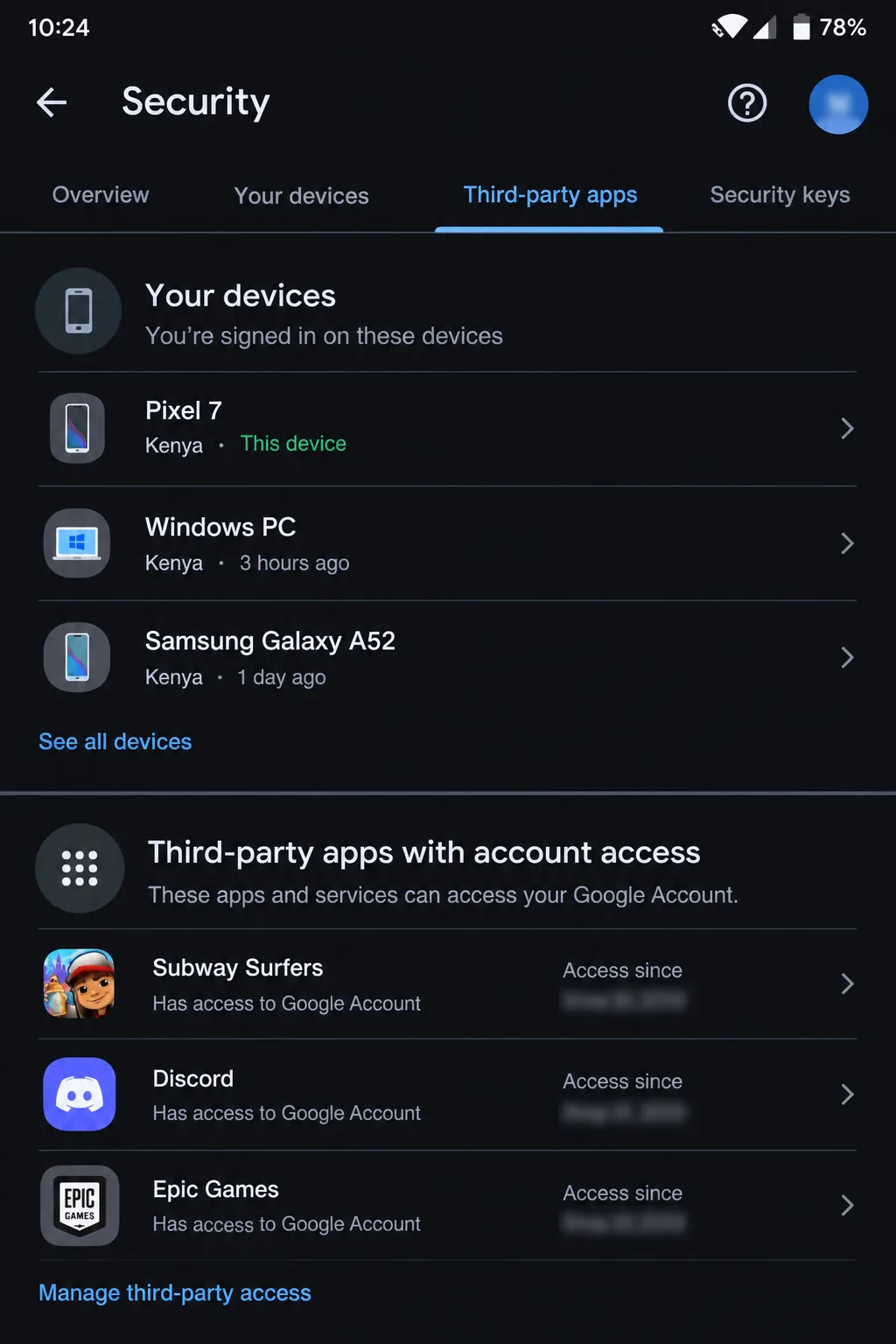
Conclusion
Mobile gaming security depends on defenses: unique passwords, a password manager, two‑factor authentication or passkeys, official app stores, up‑to‑date software, and careful handling of links and permissions. IOS and Android both provide tools for this. IOS relies on controlled distribution and built‑in Apple protections. Android uses scanning, permissions, and passkey support. Small consistent habits do more to stop an account takeover than any setting. The best time to run the ten-minute checklist is before the match, purchase or reward notification gives an attacker an opening. For practical walkthroughs, Following these steps measurably reduces account-takeover risk. Browse our security guides or revisit the full online gaming security guide.
Frequently Asked Questions
What is mobile gaming security?
Mobile gaming security is the set of practices and tools that protect gaming accounts, in-app purchases, and personal data on smartphones and tablets from unauthorized access, fraud, and malware.
How do hackers steal gaming accounts on iOS and Android?
Hackers steal gaming accounts through phishing messages, passwords reused from other breaches (credential stuffing), malicious or modded apps, SIM-swap fraud, and unsecured public Wi-Fi that captures login details or session data.
How can you spot a gaming phishing scam on mobile?
Watch for urgent or limited-time rewards, misspelled or shortened links, requests for a password or verification code, offers far more generous than the game normally gives, and login pages that do not match the publisher's official domain.
Does two-factor authentication stop gaming account takeovers?
Two-factor authentication blocks many takeovers because a stolen password alone is no longer enough to log in. The attacker would also need the second step, such as an authenticator code or a passkey.
Is iOS or Android safer for mobile gaming?
Both platforms can be secure when the device is kept updated and configured carefully. iOS emphasizes controlled app distribution and Apple Account protections, while Android offers Play Protect scanning, granular permissions, and passkey support.
Are passkeys better than passwords for gaming accounts?
Passkeys are more resistant to phishing than passwords because they cannot be typed into a fake site, shared, or copied. They are only useful where a game or publisher supports them, so keep a unique password and 2FA elsewhere.
What should you do if your mobile gaming account is hacked?
Secure the linked email account first, then change the gaming password, reset 2FA and recovery codes, sign out of unfamiliar sessions, check for unauthorized purchases, and contact the publisher through its official support channel.
Sources
- Akamai. Report Reveals Broad, Persistent Cyber Attacks Targeting Video Game Players and Companies (Sept 2020)
- Microsoft Research. How effective is multifactor authentication at deterring cyberattacks? (2023)
- Cifas. 1,055% surge in unauthorised SIM swaps (2025)
- CISA and partners. Mobile Communications Best Practice Guidance (Dec 2024)
- Apple Support. About Stolen Device Protection for iPhone
- Apple Support. Two-factor authentication for Apple Account
- Apple Support. About alternative app distribution
- Google Play Help. Use Google Play Protect to help keep your apps safe
- Google Account Help. Sign in with a passkey instead of a password
- Android Developers. Android developer verification
- The Hacker News. Google sets Sept. 30 deadline for Android developer verification (June 2026)
- Android Police. Google puts a number on the risk of sideloading (Mar 2025), reporting Google's Android Developers Blog analysis
- Android Headlines. NoVoice Android malware found in 50+ Google Play apps (Apr 2026), citing McAfee and BleepingComputer
- Forbes. Google Play Store warning, reporting Google's fraud-malware analysis (Oct 2024)
- The Ultimate Guide to How to Improve Security for Online Gaming
- Gaming Security in 2026: How to Actually Keep Your Accounts Safe
- Fake Game Cheats Are Stealing Accounts at Scale
- Router Security for Gamers 2026
Explore the Gaming Security Hub
Related reading
- Death Stranding 2 PC Launch: Kojima's Asynchronous Masterpiece Finally Comes to Steam
- Dead by Daylight All-Kill Update: The K-Pop Chapter and Trickster Rework Explained
- Arc Raiders Flashpoint Update: What's New in the Extraction Shooter Making Noise in 2026
- Helldivers 2 Force of Law Warbond: New Weapons, Armor, and What It Means for the Live-Service Shooter Meta
- Resident Evil: Requiem Terrifies Consoles: Biggest New Game Releases February 2026